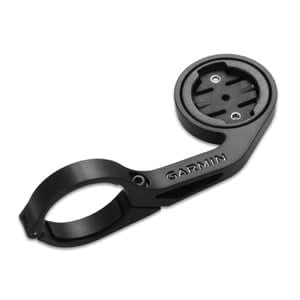
As someone who has swapped through a dozen different mounting solutions across multiple bikes, I learned everything there is to know about where data display meets aerodynamics. Today, I will share it all with you.
Computer Mounting: Where Data Display Meets Aerodynamics
The debate between Garmin and Wahoo extends beyond software preferences to mounting systems—how your computer attaches to your bike affects aerodynamics, visibility, vibration exposure, and stem compatibility. The mounting ecosystem has evolved significantly, with proprietary and third-party options creating opportunities for optimization beyond stock configurations.
Stock Mount Comparison
Garmin out-front mounts: Quarter-turn interface inherited from wristwatch design. The mount positions the unit ahead of the handlebars with 25-35mm of forward extension. Stock plastic mounts work adequately but flex under vibration. Metal upgrade mounts (Garmin’s own or K-Edge, Barfly alternatives) eliminate flex.
Wahoo out-front mounts: Bolt-on system using two M4 bolts. Inherently more secure than quarter-turn but requires tools for installation/removal. Stock Wahoo mounts are aluminum, providing better stiffness than Garmin’s plastic options.
Aerodynamic Considerations
Wind tunnel data reveals meaningful drag differences between mounting approaches:
- Stem-integrated mounts (lowest drag): 1-2 watts savings versus out-front at 45 km/h
- Short out-front (25mm extension): Baseline position, minimal penalty
- Long out-front (50mm extension): 1-2 watts penalty versus short out-front
- Steerer tube mount: Depends on position; can be drag-neutral if in stem shadow
The key insight: computer position relative to stem profile determines drag. A computer hidden behind an aero stem generates less drag than one protruding into clean airflow.
Out-Front Mount Categories
Single-sided mounts: Computer extends over centerline. Standard configuration for most riders. Pros: centered display, clean aesthetics. Cons: slight handlebar reach reduction, potential for bar strike in crashes.
Dual-sided mounts: Computer on one extension, light on the other. Balances weight distribution and integrates accessories. Common with K-Edge Combo mounts. Adds complexity but provides cleaner overall cockpit.
Combo mounts (computer + light + camera): All-in-one solutions from K-Edge, Bar Fly, and others accommodate multiple accessories. Weight and complexity increase, but cable management and aesthetics improve.
Visibility Optimization
Mount angle affects screen readability:
- Flat (0 degrees): Best for upright positions, difficult to read in aero tuck
- 5-10 degree tilt: Optimal for most road positions, slight forward tilt faces screen toward rider
- 15+ degree tilt: Aggressive aero positions where head is low
Adjustable-angle mounts (K-Edge adjustable, Quad Lock) allow fine-tuning. Fixed-angle mounts require selecting appropriate angle at purchase.
Stem Integration Options
Several stem manufacturers now offer integrated computer mounts:
Specialized Future stems: Proprietary mount system, adapters available for Garmin and Wahoo
Zipp SL Sprint: Integrated Quickview mount for Garmin quarter-turn
Canyon H36/H31 Aerocockpit: Integrated mount positions computer within handlebar unit
3T Aura Team: Integrated mount with multiple accessory positions
Integrated systems reduce drag but limit flexibility—swapping stems requires compatible mount or adapter.
Vibration Management
Computer reliability suffers from excessive vibration. Mounting material and position affect vibration transmission:
- Aluminum mounts: Transmit more vibration than plastic but eliminate flex
- Carbon mounts: Vibration characteristics between aluminum and plastic, premium weight savings
- Rubber isolation: Some mounts include vibration-damping inserts (Quad Lock, RAM mounts)
Wahoo units have historically shown better vibration tolerance than Garmin. The Garmin Edge 1040 and 540 series improved significantly over earlier models. If experiencing frequent GPS dropouts or power meter disconnects, consider mount system as a contributing factor.
Third-Party Mount Ecosystem
K-Edge: Precision CNC aluminum mounts, multiple configurations, consistent quality. Premium pricing ($50-100) justified by durability.
Bar Fly: Composite and aluminum options at moderate pricing ($30-60). Good value, adequate stiffness.
Quad Lock: Magnetic quick-release system works across devices. Convenient for riders using phone navigation. Adds weight but maximizes flexibility.
Raceware Direct: Ultra-light 3D-printed mounts in titanium or aluminum. Minimalist aesthetics, race-focused weight savings.
Multi-Device Mounting
Riders running multiple computers (Garmin for navigation + Wahoo for data) or computer + action camera need strategic mounting:
Stacked mounts: Camera below, computer above—keeps computer visible, camera in clean air for footage.
Side-by-side mounts: Wider but lower profile. Works with dual out-front extensions.
Top tube mounts: Alternative computer position frees stem area for camera. Requires looking down but works for secondary displays.
Installation Best Practices
- Torque specification: Follow manufacturer specs (typically 2-4 Nm for alloy mounts)
- Thread preparation: Light grease on bolt threads prevents seizing
- Shim selection: Match shim to handlebar diameter (31.8mm standard, 35mm oversize)
- Position testing: Test visibility and reach before final tightening
- Crash replacement: Inspect mounts after any crash; stress fractures may not be visible
The Decision Framework
Prioritize aerodynamics: Stem-integrated mount or short out-front behind aero stem
Prioritize visibility: Adjustable-angle out-front, positioned higher in field of view
Prioritize flexibility: Universal mount (K-Edge combo) accommodating multiple accessories
Prioritize simplicity: Stock manufacturer mount, replaced when worn
Computer mounting is a micro-optimization, but in a sport where marginal gains compound, the right mount position contributes to both performance data visibility and measurable drag reduction. Match your mount to your cockpit, your position, and your priorities.

Stay in the loop
Get the latest pro bike tech updates delivered to your inbox.